实验拓扑
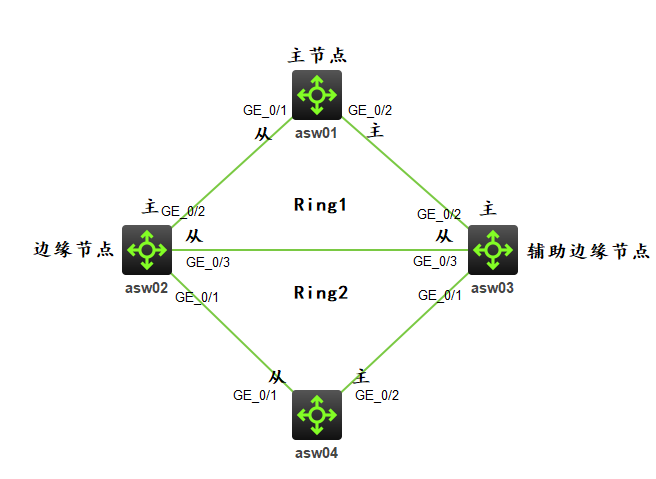
实验需求
- 网络中所有交换机之间的链路配置为 Trunk,放行所有 VLAN
- 按照图示配置 RRPP 保护所有 VLAN 数据,Ring1 为主环,Ring2 为子环,其他节点和主从端口如图,控制 VLAN 为 Vlan100
实验解法
- 网络中所有交换机之间的链路配置为 Trunk,放行所有 VLAN,步骤略
- 把所有交换机的相关端口都禁用 stp,步骤略
配置 RRPP
步骤 1:在 asw04 上配置为 RRPP 主节点,保护 Instance0-32,控制VLAN 为 Vlan100,运行在 Ring1,为主环,GE_1/0/2 口为主端口,GE_1/0/1 口为副端口[asw04]rrpp domain 1 [asw04-rrpp-domain1]protected-vlan reference-instance 0 to 32 [asw04-rrpp-domain1]control-vlan 100 [asw04-rrpp-domain1]ring 1 node-mode master primary-port GigabitEthernet 1/0/2 secondary-port GigabitEthernet 1/0/1 level 0 [asw04-rrpp-domain1]ring 1 enable [asw04]rrpp enable步骤 2:在 asw03 上配置为 RRPP Ring1 中的传输节点,和 Ring2 中的辅助边缘节点
[asw03]rrpp domain 1
[asw03-rrpp-domain1]protected-vlan reference-instance 0 to 32
[asw03-rrpp-domain1]control-vlan 100
[asw03-rrpp-domain1]ring 1 node-mode transit primary-port GigabitEthernet 1/0/2 secondary-port GigabitEthernet 1/0/3 level 0
[asw03-rrpp-domain1]ring 2 node-mode assistant-edge edge-port GigabitEthernet 1/0/1
[asw03-rrpp-domain1]ring 1 enable
[asw03-rrpp-domain1]ring 2 enable
[asw03]rrpp enable
步骤 3:在 asw02 上配置为 RRPP Ring1 中的传输节点,和 Ring2 中的边缘节点
[asw02]rrpp domain 1
[asw02-rrpp-domain1]protected-vlan reference-instance 0 to 32
[asw02-rrpp-domain1]control-vlan 100
[asw02-rrpp-domain1]ring 1 node-mode transit primary-port GigabitEthernet 1/0/2 secondary-port GigabitEthernet 1/0/3 level 0
[asw02-rrpp-domain1]ring 2 node-mode edge edge-port GigabitEthernet 1/0/1
[asw02-rrpp-domain1]ring 1 enable
[asw02-rrpp-domain1]ring 2 enable
[asw02]rrpp enable
步骤 4:在 asw01 上配置为 RRPP Ring2 的主节点
[asw01]Rrpp domain 1
[asw01-rrpp-domain1]protected-vlan reference-instance 0 to 32
[asw01-rrpp-domain1]control-vlan 4092
[asw01-rrpp-domain1]ring 2 node-mode master primary-port GigabitEthernet 1/0/2 secondary-port GigabitEthernet 1/0/1 level 1
[asw01-rrpp-domain1]ring 2 enable
[asw01]rrpp enable