H3C设备升级
实验拓扑
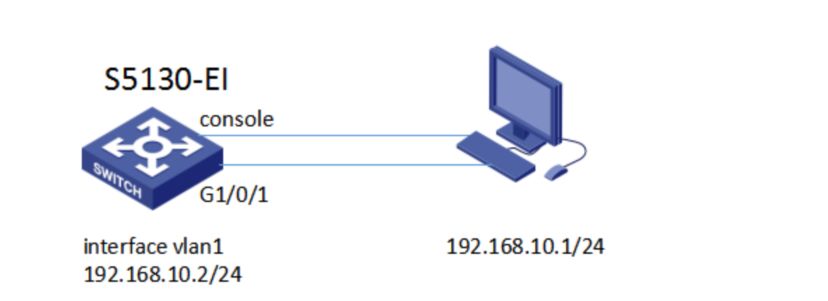
电脑使用网线和console线连接交换机、前往新华三官网下载对应设备软件版本文件
前提配置
电脑配置IP(防火墙记得关闭不然无法从交换机访问PC)
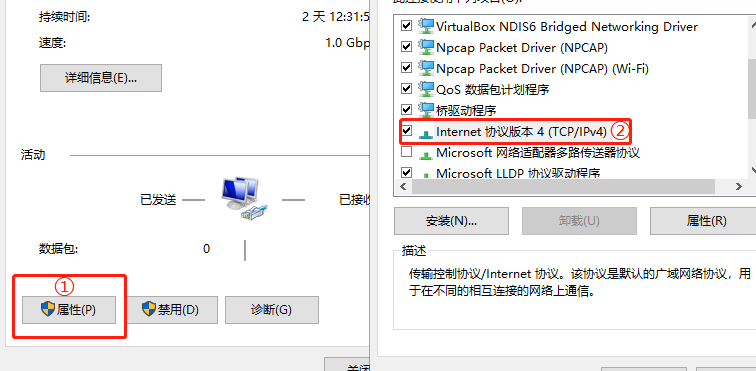
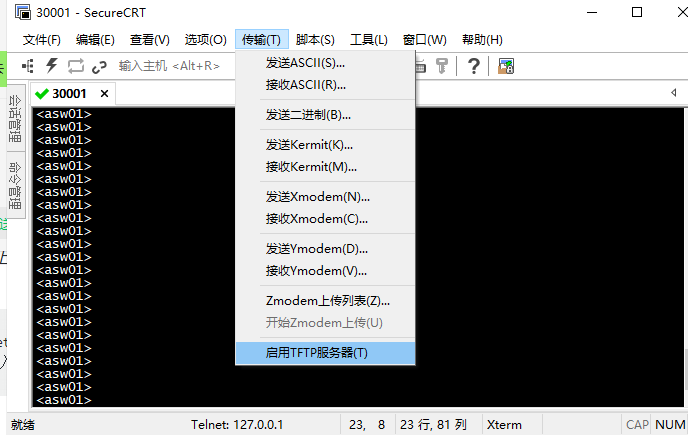
CRT开启TFTP
查看设备软件版本
[asw01]display  version    #Version7.1.070,Release3208P08为软件版本
H3C Comware Software, Version7.1.070,Release3208P08
Copyright (c) 2004-2017 New H3C Technologies Co., Ltd. All rights reserved.
H3C S5820V2-54QS-GE uptime is 0 weeks, 0 days, 0 hours, 2 minutes
Last reboot reason: User reboot
Boot image: flash:/s5820v2_5830v2-cmw710-boot-a7514.bin
Boot image version: 7.1.075, Alpha 7571
  Compiled Sep 20 2017 16:00:00
Boot image: flash:/s5820v2_5830v2-cmw710-system-a7514.bin
Boot image version: 7.1.075, Alpha 7571
  Compiled Sep 20 2017 16:00:00
查看当前设备内文件、和删除文件
<asw01>dir    #查看设备文件目录
Directory of flash:
   0 drw-           - Oct 29 2022 21:37:16   diagfile
   1 -rw-       21632 Oct 29 2022 21:37:16   licbackup
   2 drw-           - Oct 29 2022 21:37:16   license
   3 -rw-       21632 Oct 29 2022 21:37:16   licnormal
   4 drw-           - Oct 29 2022 21:37:16   logfile
   5 -rw-           0 Oct 29 2022 21:37:16   s5820v2_5830v2-cmw710-boot-a7514.bin
   6 -rw-           0 Oct 29 2022 21:37:16   s5820v2_5830v2-cmw710-system-a7514.bin
   7 drw-           - Oct 29 2022 21:37:16   seclog

1046512 KB total (1046432 KB free)

<asw01>delete 文件名   #删除指定文件
命令行升级
步骤 1:配置交换机管理口IP使能和你PC互通,通过TFTP上传到交换机内
[asw01]interface  Vlan-interface  1
[asw01-Vlan-interface1]ip address  192.168.10.2 24
<asw01>tftp 目的IP get 文件名称          #目的IP为你电脑设置的IP,get下载、put上传
步骤 2:指定下次启动文件,并重启设备
<asw01>boot-loader file  flash:/文件名     #指定下次启动时使用的软件包
<asw01>reboot     #重启设备
Start to check configuration with next startup configuration file, please wait.........DONE!
Current configuration may be lost after the reboot, save current configuration? [Y/N]:N     #是否保存刚才的配置
This command will reboot the device. Continue? [Y/N]:Y   #是否确定重启设备
Now rebooting, please wait...
通过Bootware菜单升级
暂时没真机暂无法演示