实验配置RRPP单环配置及排错
1.实验目的
完成本实验,您应该能够:
- 掌握RRPP单环配置方法
- 掌握RRPP协议运行情况
2.实验拓扑图及IP规划
实验拓扑图:
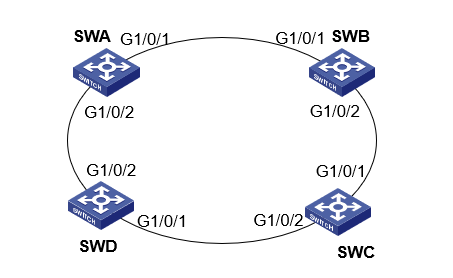
图1 RRPP单环配置及排错
IP地址规划:
| 设备名称 | VLAN 编号 | 端口 | 说明 |
|---|---|---|---|
| SWA | VLAN 4092 | G1/0/1至G1/0/2 | 控制VLAN |
| VLAN 1~30 | G1/0/1至G1/0/2 | 保护VLAN | |
| SWB | VLAN 4092 | G1/0/1至G1/0/2 | 控制VLAN |
| VLAN 1~30 | G1/0/1至G1/0/2 | 保护VLAN | |
| SWC | VLAN 4092 | G1/0/1至G1/0/2 | 控制VLAN |
| VLAN 1~30 | G1/0/1至G1/0/2 | 保护VLAN | |
| SWD | VLAN 4092 | G1/0/1至G1/0/2 | 控制VLAN |
| VLAN 1~30 | G1/0/1至G1/0/2 | 保护VLAN |
表1 RRPP单环配置及排错
3.实验过程
实验任务一:RRPP单环配置
本实验任务主要是通过RRPP协议解决二层网络环路问题,RRPP 是专门应用于以太网环的链路层协议,具有比生成树协议更快的收敛速度,当以太网环完整时它能够防止数据环路引起的广播风暴,且收敛时间与环网上节点数无关,可应用于网络直径较大的网络
步骤一:基本配置
按照图1搭建实验环境,给设备改名,根据表1为所有设备配置相应VLAN,配置参考基本实验配置。
步骤二:创建MST域
配置SWA:
[SWA]vlan 1 to 30
[SWA]stp region-configuration
[SWA-mst-region]instance 1 vlan 1 to 30
[SWA-mst-region]active region-configuration
配置SWB:
[SWB]vlan 1 to 30
[SWB]stp region-configuration
[SWB-mst-region] instance 1 vlan 1 to 30
[SWB-mst-region] active region-configuration
配置SWC:
[SWC]vlan 1 to 30
[SWC]stp region-configuration
[SWC-mst-region] instance 1 vlan 1 to 30
[SWC-mst-region] active region-configuration
配置SWD:
[SWD]vlan 1 to 30
[SWD]stp region-configuration
[SWD-mst-region] instance 1 vlan 1 to 30
[SWD-mst-region] active region-configuration
步骤三:设置端口类型为TRUNK
分别在端口G1/0/1和G1/0/2上配置物理连接状态up/down抑制时间为0 秒(即不抑制),关闭生成树协议,并将端口配置为 Trunk 端口且允许 VLAN 1~30 通过:
配置SWA:
[SWA]interface GigabitEthernet 1/0/1
[SWA-GigabitEthernet1/0/1]link-delay 0
[SWA-GigabitEthernet1/0/1]undo stp enable
[SWA-GigabitEthernet1/0/1]port link-type trunk
[SWA-GigabitEthernet1/0/1]port trunk permit vlan 1 to 30
[SWA]interface GigabitEthernet 1/0/2
[SWA-GigabitEthernet1/0/2]link-delay 0
[SWA-GigabitEthernet1/0/2]undo stp enable
[SWA-GigabitEthernet1/0/2]port link-type trunk
[SWA-GigabitEthernet1/0/2]port trunk permit vlan 1 to 30
配置SWB:
[SWB]interface GigabitEthernet1/0/1
[SWB-GigabitEthernet1/0/1] port link-mode bridge
[SWB-GigabitEthernet1/0/1] port link-type trunk
[SWB-GigabitEthernet1/0/1] port trunk permit vlan 1 to 30
[SWB-GigabitEthernet1/0/1] link-delay 0
[SWB-GigabitEthernet1/0/1] undo stp enable
[SWB-GigabitEthernet1/0/1]interface GigabitEthernet1/0/2
[SWB-GigabitEthernet1/0/2] port link-mode bridge
[SWB-GigabitEthernet1/0/2] port link-type trunk
[SWB-GigabitEthernet1/0/2] port trunk permit vlan 1 to 30
[SWB-GigabitEthernet1/0/2] link-delay 0
[SWB-GigabitEthernet1/0/2] undo stp enable
配置SWC:
[SWC]interface GigabitEthernet1/0/1
[SWC-GigabitEthernet1/0/1] port link-mode bridge
[SWC-GigabitEthernet1/0/1] port link-type trunk
[SWC-GigabitEthernet1/0/1] port trunk permit vlan 1 to 30
[SWC-GigabitEthernet1/0/1] link-delay 0
[SWC-GigabitEthernet1/0/1] undo stp enable
[SWC-GigabitEthernet1/0/1]interface GigabitEthernet1/0/2
[SWC-GigabitEthernet1/0/2] port link-mode bridge
[SWC-GigabitEthernet1/0/2] port link-type trunk
[SWC-GigabitEthernet1/0/2] port trunk permit vlan 1 to 30
[SWC-GigabitEthernet1/0/2] link-delay 0
[SWC-GigabitEthernet1/0/2] undo stp enable
配置SWD:
[SWD]interface GigabitEthernet1/0/1
[SWD-GigabitEthernet1/0/1] port link-mode bridge
[SWD-GigabitEthernet1/0/1] port link-type trunk
[SWD-GigabitEthernet1/0/1] port trunk permit vlan 1 to 30
[SWD-GigabitEthernet1/0/1] link-delay 0
[SWD-GigabitEthernet1/0/1] undo stp enable
[SWD-GigabitEthernet1/0/1]interface GigabitEthernet1/0/2
[SWD-GigabitEthernet1/0/2] port link-mode bridge
[SWD-GigabitEthernet1/0/2] port link-type trunk
[SWD-GigabitEthernet1/0/2] port trunk permit vlan 1 to 30
[SWD-GigabitEthernet1/0/2] link-delay 0
[SWD-GigabitEthernet1/0/2] undo stp enable
步骤四:创建 RRPP 域
将 VLAN 4092 配置为该域的主控制 VLAN,并将 MSTI 1 所映射的 VLAN 配置 为该域的保护 VLAN;
配置本设备为主环Ring 1的主节点,主端口为G1/0/1,副端口为G1/0/2, 并开启该环:
配置SWA:
[SWA] rrpp enable
[SWA] rrpp domain 1
[SWA-rrpp-domain1] control-vlan 4092
[SWA-rrpp-domain1] protected-vlan reference-instance 1
[SWA-rrpp-domain1] ring 1 node-mode master primary-port GigabitEthernet 1/0/1 secondary-port GigabitEthernet 1/0/2 level 0
[SWA-rrpp-domain1] ring 1 enable
[SWA-rrpp-domain1] quit
配置SWB:
[SWB] rrpp enable
[SWB]rrpp domain 1
[SWB-rrpp-domain1] control-vlan 4092
[SWB-rrpp-domain1] protected-vlan reference-instance 1
[SWB-rrpp-domain1]ring 1 node-mode transit primary-port GigabitEthernet1/0/1 secondary-port GigabitEthernet1/0/2 level 0
[SWB-rrpp-domain1] ring 1 enable
[SWB-rrpp-domain1] quit
配置SWC:
[SWC] rrpp enable
[SWC]rrpp domain 1
[SWC-rrpp-domain1] control-vlan 4092
[SWC-rrpp-domain1] protected-vlan reference-instance 1
[SWC-rrpp-domain1]ring 1 node-mode transit primary-port GigabitEthernet1/0/1 secondary-port GigabitEthernet1/0/2 level 0
[SWC-rrpp-domain1] ring 1 enable
[SWC-rrpp-domain1] quit
配置SWD:
[SWD] rrpp enable
[SWD]rrpp domain 1
[SWD-rrpp-domain1] control-vlan 4092
[SWD-rrpp-domain1] protected-vlan reference-instance 1
[SWD-rrpp-domain1]ring 1 node-mode transit primary-port GigabitEthernet1/0/1 secondary-port GigabitEthernet1/0/2 level 0
[SWD-rrpp-domain1] ring 1 enable
[SWD-rrpp-domain1] quit
步骤五:显示RRPP运行情况
配置完成后,用户可以使用 display 命令显示各设备上 RRPP 的配置和运行情况
[SWA]display rrpp statistics domain 1
Ring ID : 1
Ring level : 0
Node mode : Master
Active status : Yes
Primary port : GE1/0/1
Fast-Hello packets: 0 Sent, 0 Received
Fast-Edge-Hello packets: 0 Sent, 0 Received
Direct Hello Link Common Complete Edge Major Total
down flush FDB flush FDB hello fault
--------------------------------------------------------------------------
Out 242 0 1 0 0 0 243
In 0 0 1 0 0 0 1
Secondary port: GE1/0/2
Fast-Hello packets: 0 Sent, 0 Received
Fast-Edge-Hello packets: 0 Sent, 0 Received
Direct Hello Link Common Complete Edge Major Total
down flush FDB flush FDB hello fault
--------------------------------------------------------------------------
Out 0 0 1 0 0 0 1
In 0 0 0 0 0 0 0
[SWB]display rrpp statistics domain 1
Ring ID : 1
Ring level : 0
Node mode : Master
Active status : Yes
Primary port : GE1/0/1
Fast-Hello packets: 0 Sent, 0 Received
Fast-Edge-Hello packets: 0 Sent, 0 Received
Direct Hello Link Common Complete Edge Major Total
down flush FDB flush FDB hello fault
--------------------------------------------------------------------------
Out 367 0 1 0 0 0 368
In 0 0 0 0 0 0 0
Secondary port: GE1/0/2
Fast-Hello packets: 0 Sent, 0 Received
Fast-Edge-Hello packets: 0 Sent, 0 Received
Direct Hello Link Common Complete Edge Major Total
down flush FDB flush FDB hello fault
--------------------------------------------------------------------------
Out 0 0 1 0 0 0 1
In 0 0 0 0 0 0 0
[SWC]display rrpp statistics domain 1
Ring ID : 1
Ring level : 0
Node mode : Master
Active status : Yes
Primary port : GE1/0/1
Fast-Hello packets: 0 Sent, 0 Received
Fast-Edge-Hello packets: 0 Sent, 0 Received
Direct Hello Link Common Complete Edge Major Total
down flush FDB flush FDB hello fault
--------------------------------------------------------------------------
Out 966 0 1 0 0 0 967
In 0 0 1 0 0 0 1
Secondary port: GE1/0/2
Fast-Hello packets: 0 Sent, 0 Received
Fast-Edge-Hello packets: 0 Sent, 0 Received
Direct Hello Link Common Complete Edge Major Total
down flush FDB flush FDB hello fault
--------------------------------------------------------------------------
Out 0 0 1 0 0 0 1
In 0 0 1 0 0 0 1
[SWD]display rrpp statistics domain 1
Ring ID : 1
Ring level : 0
Node mode : Master
Active status : Yes
Primary port : GE1/0/1
Fast-Hello packets: 0 Sent, 0 Received
Fast-Edge-Hello packets: 0 Sent, 0 Received
Direct Hello Link Common Complete Edge Major Total
down flush FDB flush FDB hello fault
--------------------------------------------------------------------------
Out 1055 0 1 0 0 0 1056
In 0 0 0 0 0 0 0
Secondary port: GE1/0/2
Fast-Hello packets: 0 Sent, 0 Received
Fast-Edge-Hello packets: 0 Sent, 0 Received
Direct Hello Link Common Complete Edge Major Total
down flush FDB flush FDB hello fault
--------------------------------------------------------------------------
Out 0 0 1 0 0 0 1
In 0 0 1 0 0 0 1
实验任务二:主节点收不到Hello报文排错
步骤一:把SWC关闭RRPP协议
在SWC上配置:
[SWC]undo RRPP enable
步骤二:故障分析及信息收集
在SWC上查看运行情况:
<SWA>display rrpp verbose domain 1
Domain ID : 1
Control VLAN : Primary 4092, Secondary 4093
Protected VLAN: Reference instance 1
Hello timer : 1 seconds, Fail timer: 3 seconds
Fast detectioln status: Disabled
Fast-Hello timer: 20 ms, Fast-Fail timer: 60 ms
Fast-Edge-Hello timer: 10 ms, Fast-Edge-Fail timer: 30 ms
Ring ID : 1
Ring level : 0
Node mode : Master
Ring state : Failed
Enable status : Yes, Active status: Yes
Primary port : GE1/0/1 Port status: UP
Secondary port: GE1/0/2 Port status: UP
发现主端口与副端口同时打开,那么可能有两个原因:
端口处于非正常状态;
RRPP环上有节点没有开启RRPP协议。
针对原因①,可以直接查看接口信息:
[SWC]display interface brief
Brief information on interfaces in route mode:
Link: ADM - administratively down; Stby - standby
Protocol: (s) - spoofing
Interface Link Protocol Primary IP Description
InLoop0 UP UP(s) --
MGE0/0/0 DOWN DOWN --
NULL0 UP UP(s) --
REG0 UP -- --
Brief information on interfaces in bridge mode:
Link: ADM - administratively down; Stby - standby
Speed: (a) - auto
Duplex: (a)/A - auto; H - half; F - full
Type: A - access; T - trunk; H - hybrid
Interface Link Speed Duplex Type PVID Description
FGE1/0/53 DOWN 40G A A 1
FGE1/0/54 DOWN 40G A A 1
GE1/0/1 UP 1G(a) F(a) T 1
GE1/0/2 UP 1G(a) F(a) T 1
发现SWC物理端口正常,其他设备同此操作;
在SWC也通过命令display rrpp statistics domain 1查看状态信息:
[SWC]display rrpp statistics domain 1
Ring ID : 1
Ring level : 0
Node mode : Transit
Active status : No
Primary port : GE1/0/1
Fast-Hello packets: 0 Sent, 0 Received
Fast-Edge-Hello packets: 0 Sent, 0 Received
Direct Hello Link Common Complete Edge Major Total
down flush FDB flush FDB hello fault
--------------------------------------------------------------------------
Out 0 0 0 0 0 0 0
In 0 0 0 0 0 0 0
Secondary port: GE1/0/2
Fast-Hello packets: 0 Sent, 0 Received
Fast-Edge-Hello packets: 0 Sent, 0 Received
Direct Hello Link Common Complete Edge Major Total
down flush FDB flush FDB hello fault
--------------------------------------------------------------------------
Out 0 0 0 0 0 0 0
In 0 0 0 0 0 0 0
发现SWC的Active status为No,因此判断为RRPP协议未开启。
步骤三:故障排除
在SWC上配置:
[SWC]rrpp enable
观察RTC的IP路由表:
[SWC]display rrpp statistics domain 1
Ring ID : 1
Ring level : 0
Node mode : Transit
Active status : Yes
Primary port : GE1/0/1
发现SWC的Active status 为 Yes,故障排除。
4 思考
1.如果将主节点的主端口关闭,会产生什么现象?
2.此实验中可以有多个控制VLAN吗?